A productive home office doesn’t require an expensive renovation or premium furniture across the board. A handful of deliberate choices, prioritized correctly, can create a genuinely comfortable and focused workspace even within a tight budget and a small footprint.
Why Your Environment Affects Productivity More Than Expected
A cluttered, poorly lit, or physically uncomfortable workspace creates ongoing friction that accumulates throughout a workday, even if each individual issue seems minor on its own. Addressing the environment deliberately, rather than working around persistent small annoyances indefinitely, removes this friction and makes sustained focus considerably easier.
Choosing a Dedicated Spot, Even in a Small Home
A consistent, dedicated work location, even a small corner or a section of a shared room, helps create a mental association between that specific spot and focused work, which working from different locations around the house each day doesn’t provide as reliably. This matters more than the size of the space itself.
Secondhand and Refurbished Furniture Options
Office furniture from secondhand marketplaces, particularly from businesses downsizing or relocating, can offer genuinely ergonomic chairs and desks at a fraction of retail price, since commercial office furniture is often built to a higher durability standard than typical consumer home furniture. Checking secondhand options before committing to new, budget furniture is worth the extra search time for anyone prioritizing genuine ergonomic quality on a tight budget.
Desk Selection: Budget vs Ergonomics
A basic, stable desk at the correct height matters more than an expensive desk with features you won’t use. As a general guideline, a desk height that allows forearms to rest roughly parallel to the floor while typing, with feet flat on the ground, reduces strain considerably compared to a desk that’s too high or too low, regardless of the desk’s price point or styling.
Considering a Standing Desk Converter
For anyone wanting to alternate between sitting and standing without purchasing a full standing desk, a standing desk converter that sits on top of an existing desk offers much of the same flexibility at a considerably lower cost, making it a reasonable budget compromise for anyone specifically interested in that benefit without a larger furniture investment.
Chair Considerations on a Budget
The chair is arguably the single most important budget allocation in a home office setup, given how many hours it typically sees daily use. A budget chair with adjustable seat height and reasonable lower back support will serve most people considerably better than an unadjustable, purely decorative chair, even one that costs more, since ergonomic adjustability matters more than material or brand prestige for actual daily comfort.
Keyboard and Mouse Ergonomics
A keyboard and mouse positioned at the same height, close enough that shoulders can stay relaxed rather than reaching forward, reduces strain that accumulates gradually over a full workday. A wrist rest, whether a dedicated accessory or simply a folded towel, can also reduce pressure on wrists during extended typing sessions at minimal cost.
Using a Monitor or Laptop Stand for Posture
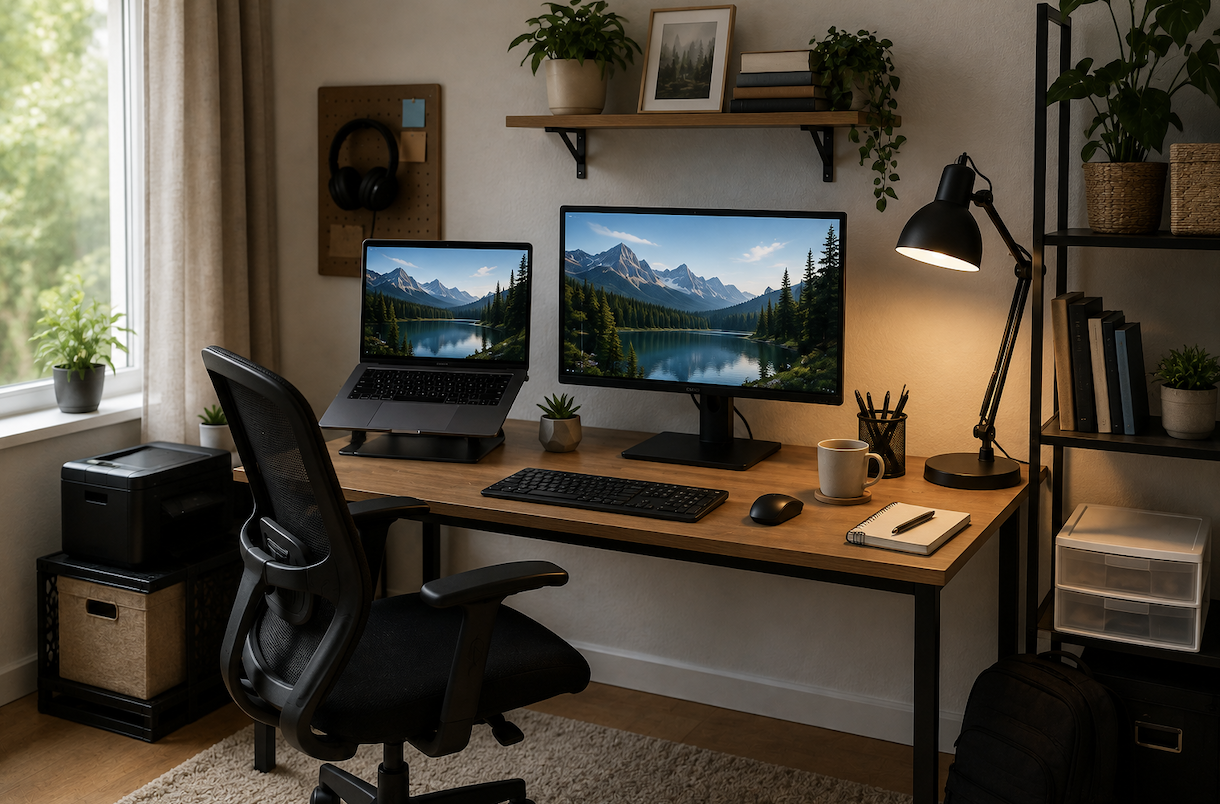
Positioning a screen so the top of the display sits roughly at eye level reduces neck strain considerably compared to looking down at a laptop placed flat on a desk. A simple, inexpensive laptop stand or even a stack of sturdy books accomplishes this adjustment at minimal cost, making it one of the highest-value, lowest-cost improvements available to a budget home office setup.
Lighting for a Home Office
Positioning a desk near a window, with natural light coming from the side rather than directly behind or in front of the screen, reduces both eye strain and screen glare throughout the day. For evening or low-light work, a dedicated desk lamp with adjustable brightness supplements overhead lighting, which is often insufficient on its own for focused, detail-oriented work.
Cable Management on a Budget
Basic cable clips, ties, or an inexpensive cable sleeve keep charging cables and peripheral wires organized and out of the way, both for a cleaner appearance and to reduce the everyday annoyance of tangled or loose cables catching on chairs and feet throughout the workday.
Choosing a Desk Mat or Surface Protector
A large desk mat, beyond aesthetic appeal, protects the desk surface from scratches and provides a smooth, consistent surface for mouse movement, which matters particularly for anyone using a budget desk with a less durable finish that might otherwise show wear more quickly.
Storage Without Clutter
A small set of desktop organizers or a single drawer unit keeps frequently used supplies accessible without accumulating visible clutter across the desk surface, which can contribute to a distracted, unfocused feeling over the course of a workday even when the clutter itself seems minor.
Budget Tech Essentials Worth Prioritizing
Beyond a functional computer, a reliable webcam and microphone setup, covered in earlier remote work guides, and a comfortable external keyboard and mouse if working primarily from a laptop, represent reasonable, moderate investments that meaningfully improve daily comfort and the professional quality of video calls, without requiring the most expensive available options in each category.
Personalizing Without Creating Distraction
A few personal touches a plant, a piece of art, a photo can make a workspace feel more pleasant without becoming a source of ongoing visual distraction, which a more elaborately decorated or cluttered setup risks introducing. Restraint in personalizing tends to serve focus better than a maximalist approach to desk decor.
Internet Connection Reliability for Remote Work
For anyone working from home regularly, the home network guidance and Wi-Fi troubleshooting steps covered in earlier technewweb guides directly support a productive home office setup, since unreliable internet undermines even the most ergonomically ideal physical workspace during video calls and file-heavy tasks.
Managing Noise in a Home Office
For anyone working in a home with other people, pets, or general household noise, a pair of noise-cancelling or simply noise-isolating headphones offers a budget-friendly way to maintain focus without needing to soundproof an entire room. This is often a more practical solution than structural noise reduction for anyone renting or working within a tight budget.
Adding Plants and Greenery
Beyond aesthetic appeal, low-maintenance plants like pothos or snake plants require minimal care while adding a sense of life and visual softness to an otherwise purely functional workspace, at a very low cost relative to other office decor options.
Considering Air Quality in a Home Office
A small air purifier or simply ensuring adequate ventilation in a home office, particularly one in a converted closet or small enclosed space, supports sustained focus and comfort over a full workday in a way that’s easy to overlook compared to more visible setup elements like desk and chair choice.
Temperature and Physical Comfort
A small personal fan or space heater, depending on the season and how well-regulated your specific workspace is compared to the rest of the home, addresses a genuinely common but easily overlooked source of daily discomfort that can meaningfully affect focus and comfort over a full workday.
Adapting a Home Office for a Small or Shared Space
For anyone working from a bedroom, living room corner, or other shared space, a fold-down desk or a desk that can be visually and physically separated from the rest of the room with a room divider or bookshelf, similar to the small-apartment storage strategies covered in earlier guides, helps maintain a psychological boundary between work and rest even without a fully separate room.
Creating a Shutdown Routine to Separate Work From Home
For a home office without a door to physically close at the end of the day, establishing a simple shutdown routine closing the laptop, tidying the desk surface, or covering the workspace with a throw helps create a mental transition out of work mode that a separate office space provides more naturally on its own.
Building a Capsule Home Office Setup Over Time
Similar to the phased approach discussed in earlier garage and closet organization guides, building a home office incrementally chair and monitor stand first, then lighting, then storage and personalization spreads the cost over time while addressing the highest-impact ergonomic items immediately, rather than waiting to afford a complete setup all at once.
Setting Boundaries With Household Members
Beyond the physical setup, communicating clear expectations with anyone else sharing the home during work hours, particularly around interruptions during calls, addresses a source of friction that no amount of desk or chair investment can solve on its own, and is worth establishing explicitly rather than assuming it will resolve itself naturally.
Common Home Office Setup Mistakes
Prioritizing desk appearance over chair quality is a common and often regretted mistake, given how much more daily impact a supportive chair has on comfort than desk aesthetics. Skipping a monitor or laptop stand entirely, assuming it’s an unnecessary expense, is another common oversight that leads to avoidable neck and back strain over months of use.
Adjusting Your Setup as Work Needs Change
A home office setup that worked well for occasional remote work may need adjustment if work arrangements shift toward full-time remote work, since the ergonomic and comfort priorities discussed throughout this guide matter considerably more for someone spending eight hours daily at the same desk compared to occasional use. Reassessing the setup after any significant change in how much time it actually sees use is a reasonable, low-effort check.
Considering a Second Monitor for a Laptop-Only Setup
For anyone whose primary computer is a laptop, adding even a single external monitor while keeping the laptop screen active as a secondary display achieves much of the same context-switching benefit discussed throughout this guide without needing to purchase two entirely new external monitors, making it a reasonable lower-cost entry point into a multi-screen setup.
Conclusion
A productive home office comes down to prioritizing ergonomic essentials chair, screen height, and lighting over purely decorative choices, and adapting the space thoughtfully even when working with a small or shared area. These priorities matter far more for daily comfort and focus than an expensive, fully furnished dedicated office room.