
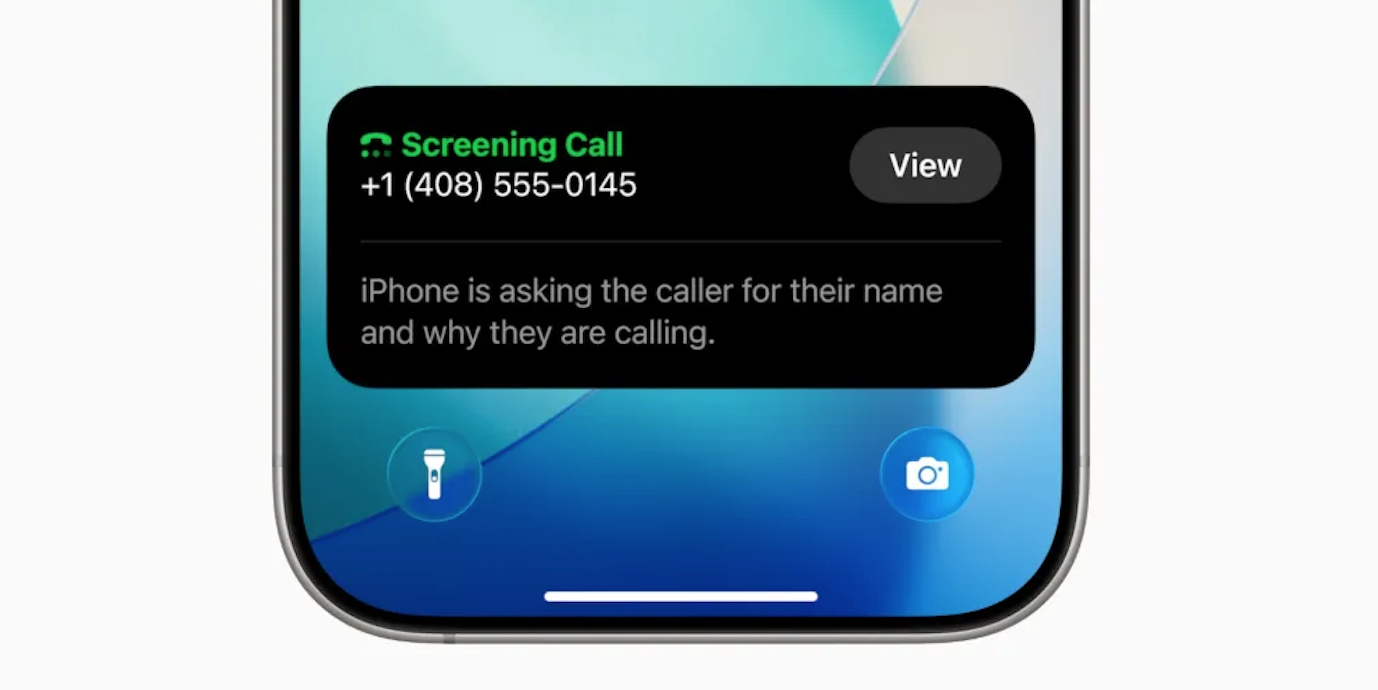
Unwanted calls interrupt focus and waste valuable time every day. As a result, many users ignore unknown numbers completely. However, iOS 26 introduces a smarter and more polite solution. This new feature screens callers before your phone even rings. Consequently, you stay informed and fully in control.
Apple now offers a built-in call screening experience. It works seamlessly and protects your privacy. Moreover, it improves communication with legitimate callers. Overall, it feels like having a personal assistant on every call.
“Ask Reason for Calling” in iOS 26: What You Need to Know
The “Ask Reason for Calling” feature acts like a virtual receptionist. Whenever an unknown number calls, your iPhone answers automatically. Then, it politely requests the caller’s name and purpose. Meanwhile, your phone stays silent and undisturbed.
The caller hears a professional automated message. After that, their response gets transcribed instantly. Next, the text appears clearly on your screen. Therefore, you decide whether to answer or decline.
This approach adds transparency to every unknown call. In contrast, spammers usually disconnect immediately. Thus, genuine callers stand out quickly and clearly.
Why iOS 26 Call Screening Feels Smarter Than Ever
Earlier versions relied heavily on voicemail. However, voicemail often delayed important responses. Now, iOS 26 handles calls in real time.
The feature filters calls without blocking communication. As a result, doctors and couriers reach you easily. At the same time, robocalls lose their power.
Furthermore, the experience feels human and respectful. Apple’s automated voice sounds calm and professional. Therefore, callers feel acknowledged rather than rejected.
How to Enable the “Ask Reason for Calling” Feature on iPhone
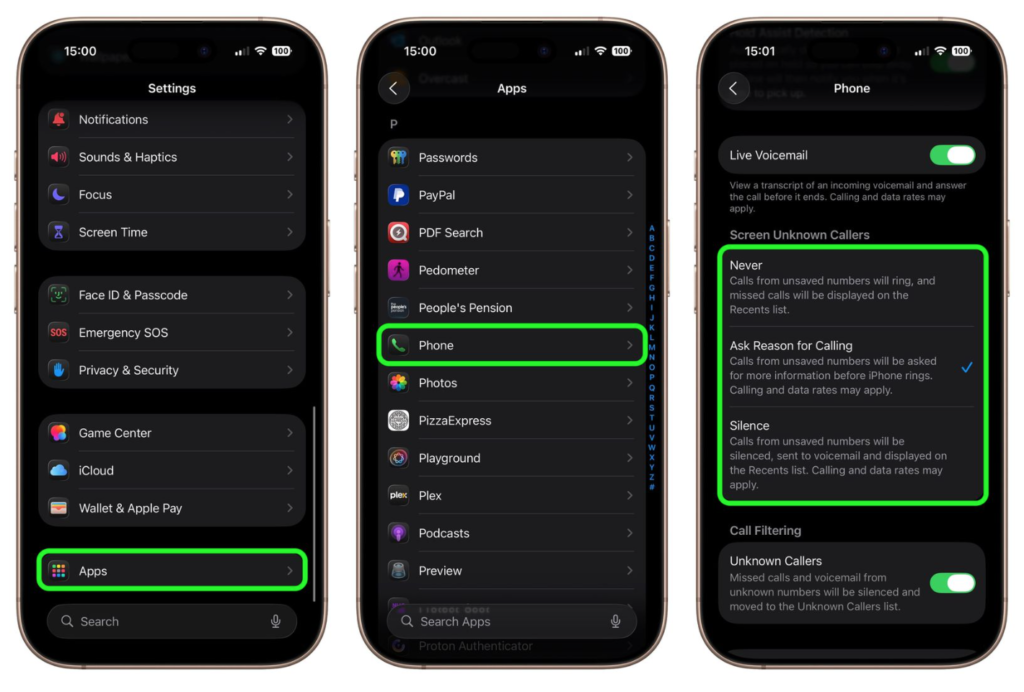
Activating this feature takes less than one minute. First, unlock your iPhone and open Settings. Next, scroll down and tap Apps. Then, select Phone from the list.
Under Screen Unknown Callers, choose Ask Reason for Calling. Finally, exit Settings and enjoy smarter call control.
Once enabled, the feature works automatically. You do not need additional apps or subscriptions. Everything stays secure and on-device.
What Happens When an Unknown Caller Rings You
Your iPhone answers silently in the background. Then, the system requests caller identification politely. While waiting, the caller stays on hold.
Their spoken response converts into readable text. Immediately, you see their name and reason. Afterward, you choose the next action confidently.
You can accept the call instantly. Alternatively, you may decline without interaction. You can even request more information. Thus, every decision feels informed and stress-free.
Comparison With Silence Unknown Callers Option
Previously, iOS offered Silence Unknown Callers. That feature sent unknown calls straight to voicemail. Although helpful, it lacked flexibility.
Important callers often left confusing messages. Sometimes, they never called back.
Consequently, users missed critical updates.
Ask Reason for Calling solves this gap. It balances protection with accessibility. Hence, communication becomes smarter and faster.
Other Unknown Caller Options Available in iOS 26
Apple still provides alternative call handling modes. Therefore, users can choose what suits them best.
The Silence option sends unknown calls to voicemail. Calls appear in Recents for later review. This option works well for minimal interruptions.
The Never option allows all calls to ring normally. Unknown numbers behave like saved contacts. This setting suits users expecting frequent new calls.
Switching between options remains simple. Just revisit Settings ➝ Apps ➝ Phone.
Why Keeping Contacts Updated Matters
The screening feature respects saved contacts fully. Any saved number rings through immediately. Therefore, updating contacts improves accuracy.
Whenever you confirm a legitimate caller, save them. This habit prevents future screening delays. Additionally, it improves overall call efficiency.
A clean contact list ensures smooth communication. It also enhances trust in every call.
Final Thoughts on iOS 26 Call Screening
iOS 26 transforms how iPhone users handle calls. The Ask Reason for Calling feature adds clarity. It also reduces daily interruptions significantly.
Moreover, it protects time and attention effectively. At the same time, it stays polite and professional. Therefore, users feel empowered rather than annoyed.
If spam calls frustrate you daily, this feature helps. It works quietly, efficiently, and intelligently. Ultimately, your iPhone becomes smarter than ever.