
Apple continues improving personalization with the upcoming iOS 26.4 update. The new release introduces several customization tools for iPhone users. These features improve visual comfort, battery control, and media accessibility. As a result, users gain more control over their device experience.
Below are three powerful customization features arriving with iOS 26.4.
Reduce Bright Effects for a More Comfortable Display
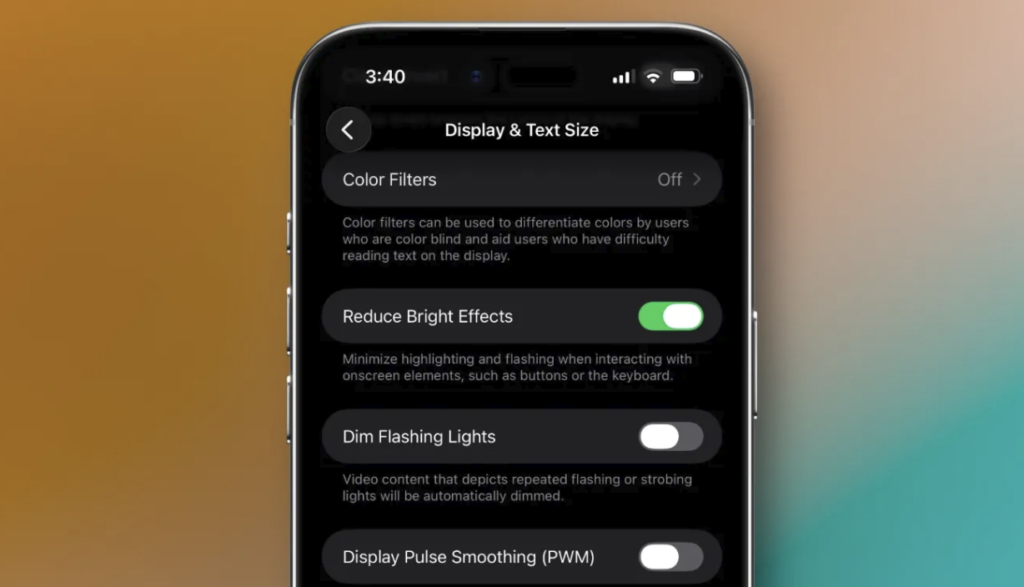
iOS 26 introduced the Liquid Glass design style. The interface includes shiny highlights and animated elements. However, not every user enjoys flashy visuals. Therefore, Apple now provides a stronger option to soften these effects. The new Reduce Bright Effects setting minimizes intense highlights and flashing animations. Consequently, the display feels calmer and easier on the eyes.
Users can enable this option inside the Accessibility settings. The path is Settings → Accessibility → Display & Text Size. Once activated, interactive elements become less visually intense. Buttons, keyboards, and other interface components show fewer bright flashes. As a result, the screen becomes more comfortable during long usage sessions.
Many users already reduce visual intensity using the Tinted Liquid Glass setting. However, Reduce Bright Effects goes even further. It actively lowers visual emphasis across the interface. This change benefits users sensitive to bright transitions. Additionally, it helps people who prefer minimalistic interface designs.
The feature also improves readability. Reduced brightness variations allow text and icons to remain visually consistent. Therefore, navigating apps becomes smoother. Overall, this option gives users greater control over iPhone visuals. Apple clearly aims to balance style with accessibility.
Automate iPhone Battery Charge Limits for Longer Battery Health
Battery health remains a major concern for smartphone users. Apple previously introduced the Charge Limit feature to help extend battery lifespan. The feature allows users to choose a maximum charge level between 80% and 100%. Charging to lower percentages often reduces long-term battery wear. Consequently, the battery can maintain stronger capacity over time.
Now iOS 26.4 makes this system significantly smarter.
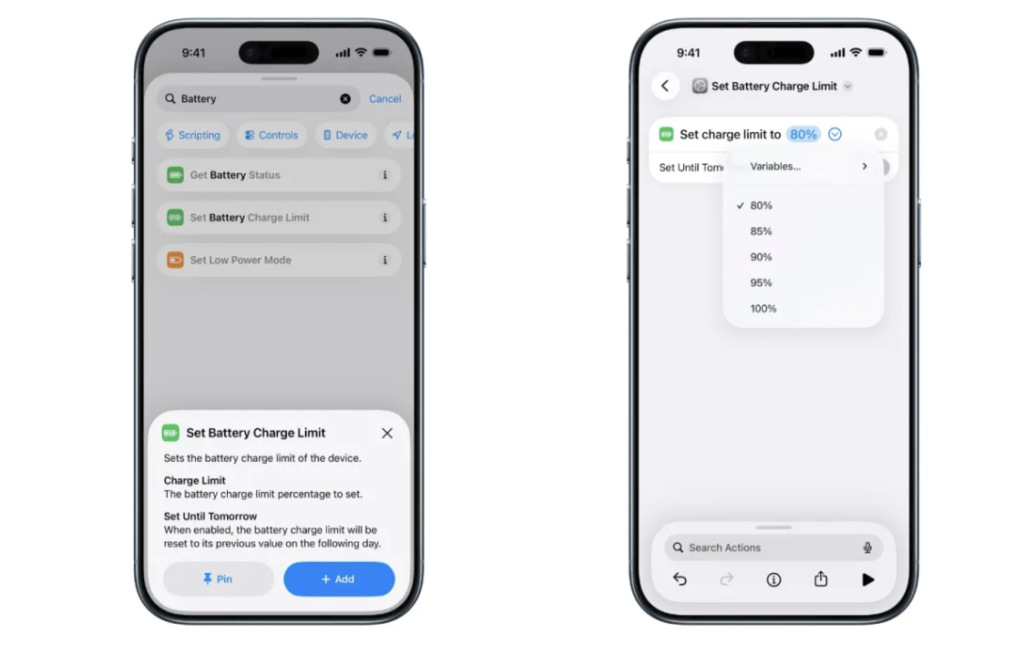
Apple added a Set Battery Charge Limit action to the Shortcuts app. This addition allows users to automate charging behavior. Automation dramatically improves flexibility. Instead of using one fixed limit, iPhones can now change charging levels automatically.
For example, users may set the battery to charge to 80% at home. However, the device could charge to 100% when traveling. This strategy balances convenience with battery protection. Shortcuts automation supports many triggers. These include location changes, Wi-Fi connections, and time schedules. Therefore, users can build highly personalized charging routines.
A user could create different rules for workdays and weekends. Another person might increase charge limits only when leaving home. These options make battery management far more intelligent. Furthermore, automation runs silently in the background. Once configured, the system adjusts charging without user interaction.
This feature gives power users greater control over battery longevity. At the same time, casual users benefit from smarter charging patterns. Overall, iOS 26.4 transforms a simple setting into a powerful automation tool.
Customize Video Subtitle Styles for Better Viewing
Watching videos on an iPhone continues growing in popularity. Streaming, browsing, and social media all rely heavily on video playback. iOS 26.4 introduces a new way to customize subtitle appearance. The default iOS video player now includes subtitle style options.
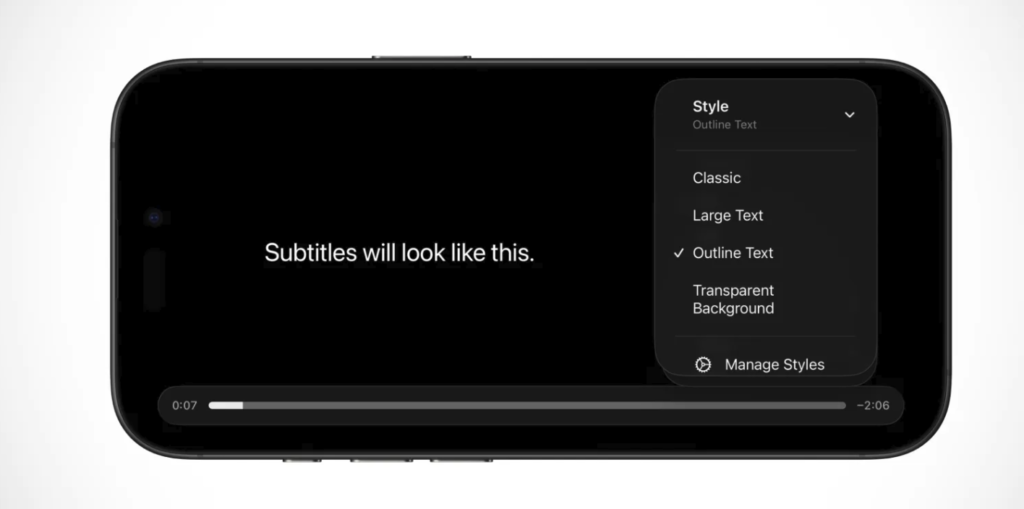
This feature works across many apps. Safari, Apple TV, and compatible streaming apps support the updated subtitle controls. Users can access the settings through the Subtitles menu during playback. A new Style option appears in the menu.
Several preset subtitle styles are available.
Available options include:
- Classic
- Large Text
- Outline Text
- Transparent Background
Each style improves readability in different viewing conditions. Large Text helps users read subtitles more easily. Outline Text improves contrast against bright backgrounds. Meanwhile, Transparent Background reduces screen obstruction during scenes. However, customization does not stop there. Apple also added a Manage Styles button for deeper control.
Selecting this option opens additional subtitle settings within Accessibility. These settings previously existed but remained hidden. Now they are easier to find and adjust.
Users can change font appearance, text color, and background visibility. Consequently, subtitles can match personal visual preferences. This improvement benefits viewers with visual challenges. However, it also helps anyone watching videos in noisy environments. Better subtitle customization improves both accessibility and convenience. As a result, iPhone video playback becomes more adaptable.
Why iOS 26.4 Improves Everyday iPhone Personalization
Apple designed iOS 26.4 to enhance practical customization. Instead of cosmetic tweaks, the update introduces meaningful control. Reduce Bright Effects creates a calmer interface experience. Battery charge automation protects long-term battery health. Meanwhile, subtitle styling improves media accessibility.
Each feature focuses on usability. Together, they make iPhones more adaptable to individual needs. Furthermore, the update highlights Apple’s growing focus on accessibility and smart automation.
Users gain greater control without increasing complexity. Settings remain simple, yet capabilities expand dramatically.
Final Thoughts on the iOS 26.4 Customization Update
iOS 26.4 delivers thoughtful improvements for iPhone users. The update strengthens personalization across visuals, battery management, and video playback. Reduce Bright Effects improves display comfort. Automated charge limits enhance battery longevity. Subtitle customization improves viewing accessibility.
These changes may appear small individually. However, together they make daily iPhone use more personalized and efficient. Users who enjoy tailoring their devices will appreciate this update. iOS 26.4 proves that meaningful customization continues evolving across Apple’s ecosystem.
Read Also: iOS 26.4 Beta Release Date Revealed with Major Siri Upgrades